The record of what a person has done and your interactions with them is the core of what makes the People Engagement Platform so powerful.
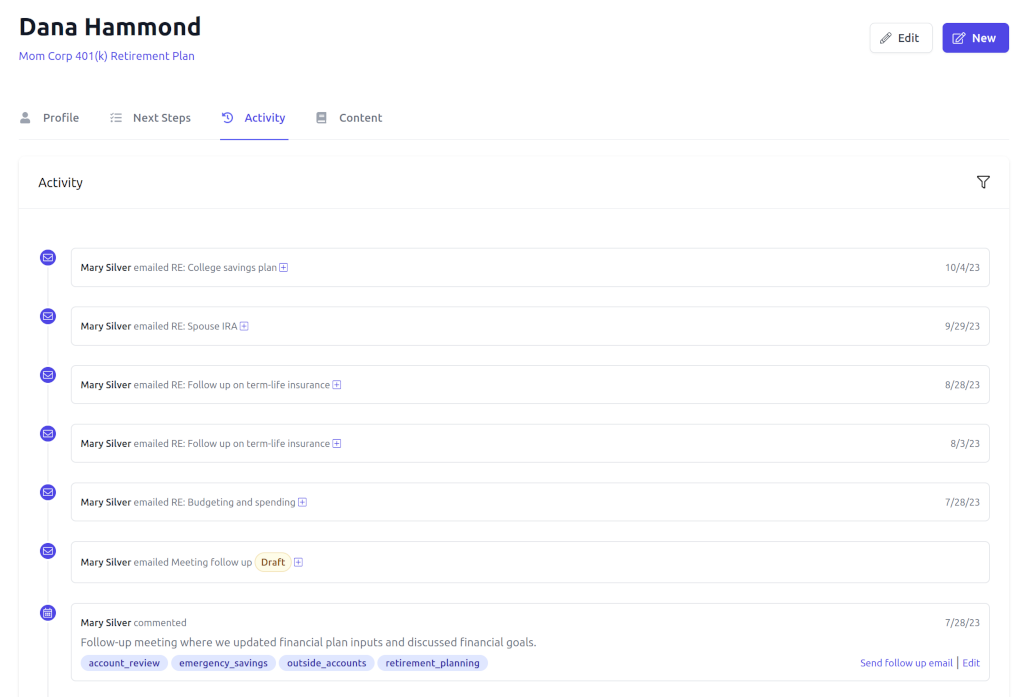
On the right-hand side of the person profile you will see a timeline that displays any calls or meetings you have had with the person, any emails you sent them, and any next steps that they have completed.
Recording Communication
If you want to record a call or meeting you can click on the meeting or phone icon. There you can add a summary of the meeting and tag it.
Tags
There are multiple tags available for recording activity. These are meant to record the topics of conversations and can be reported on. They can also be used in follow-up email templates.
You can add your own custom tags which are helpful for segmentation, reporting, and for developing and sending email templates.
Sending Emails
You can compose an original email (or use a template) by clicking on the email icon. Additionally, each activity has a Send follow-up email link which allows you to use a template that references the tags on the activity that you are sending a follow-up on.
